'%20fill-rule='evenodd'%20d='M171.52-16.97H86.06q-35.76%200-60.91-25.15Q0-67.27%200-103.03q0-35.15%2025.15-60.61%2025.15-25.45%2060.91-25.45%2035.15%200%2060.3%2025.45%2025.16%2025.46%2025.16%2060.61v86.06M86.06-146.06q-18.18%200-30.61%2012.73-12.42%2012.72-12.42%2030.3%200%2018.18%2012.42%2030.61Q67.88-60%2086.06-60q17.58%200%2030.3-12.42%2012.73-12.43%2012.73-30.61%200-17.58-12.73-30.3-12.72-12.73-30.3-12.73'/%3e%3c/svg%3e%3c/svg%3e)
First steps
Create your account, answer the three setup questions and install the app on your phone.
Create your account
Aeon is invitation only: your email address must have been allowed before you first sign in.
Open Aeon and choose Continue with Google
Use the Google account of the address that received the invitation.
That's it
On your first sign-in, your Aeon account is created automatically, and you land on Home, ready for the three setup questions.
No invitation yet?
On the sign-in page, Request an invitation lets you ask for one by email.
Sign in faster with a passkey
Once signed in, add a passkey in Account › Security: you then sign in with your fingerprint, face or a security key, with Sign in with a passkey. See Security and data.
The three setup questions
On a new account, a Welcome to Aeon card replaces the empty Home. Nothing blocks you: Skip closes it at any time, and everything can be changed later.
How will you use Aeon?
| Profile | Effect |
|---|---|
| Collector | New items go to your personal collection. |
| Occasional seller | New items go to the resale inventory. |
| Regular reseller | New items go to the resale inventory. |
| Micro-entrepreneur | Resale inventory, and business mode is turned on with the micro-entreprise status. |
What do you collect or sell?
Every category is ticked. Untick the ones you do not need: they are hidden, not deleted, and you can show them again in Stock › Categories. Keep at least one.
Where to start?
Choose Add stock, Quick capture, Scan barcodes or Import a spreadsheet to start right away, or Explore first.
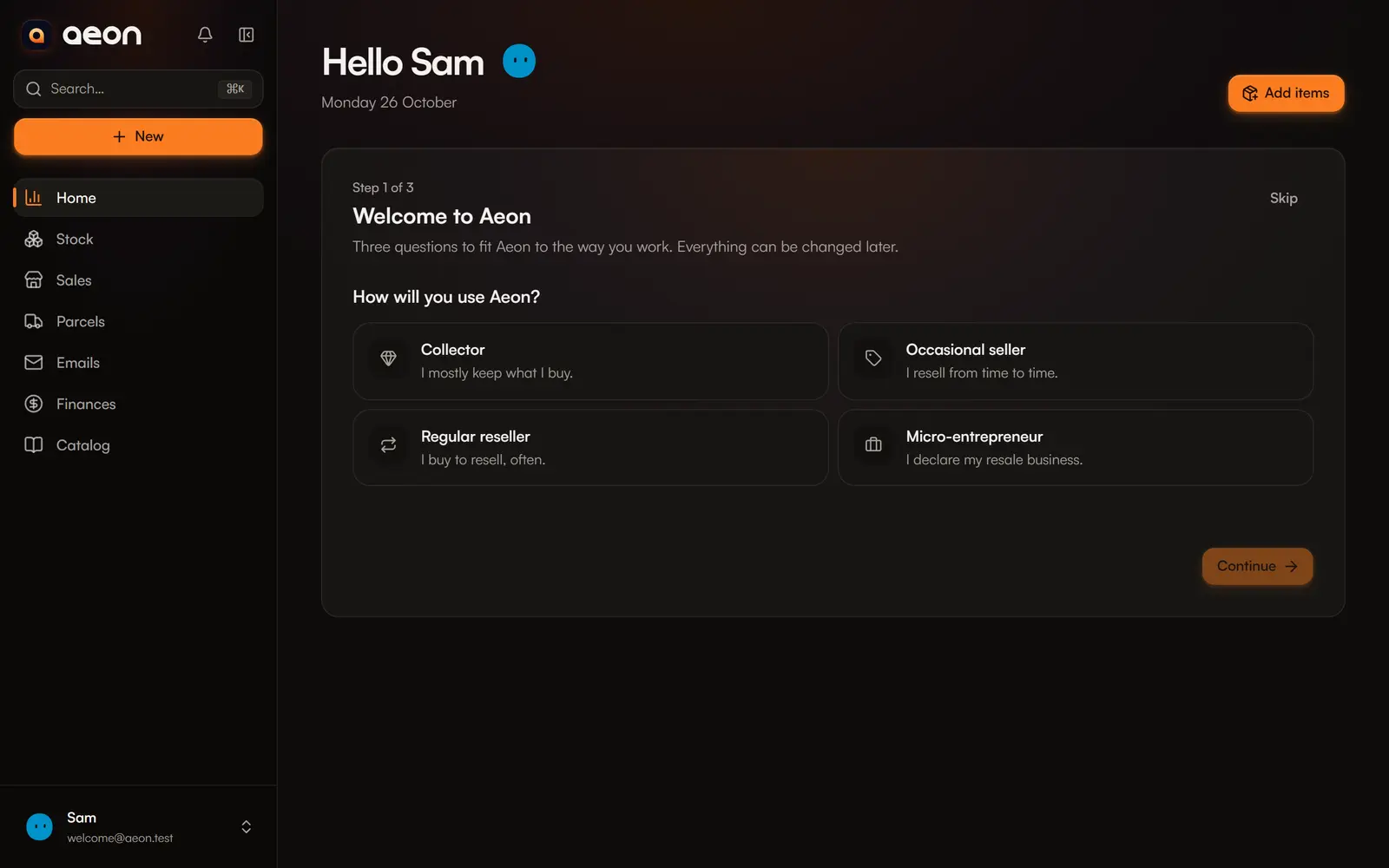
You can later change the space for new items in Account › Profile and preferences, and business mode in Account › Business tracking.
Install the app on your phone
Aeon installs like an app, without an app store: it then opens full screen and can receive notifications.
- Open Aeon in Safari.
- Tap the Share button at the bottom of the screen.
- Choose Add to Home Screen, then Add.
Aeon appears with your apps. Open it from its icon to be able to turn notifications on.