'%20fill-rule='evenodd'%20d='M171.52-16.97H86.06q-35.76%200-60.91-25.15Q0-67.27%200-103.03q0-35.15%2025.15-60.61%2025.15-25.45%2060.91-25.45%2035.15%200%2060.3%2025.45%2025.16%2025.46%2025.16%2060.61v86.06M86.06-146.06q-18.18%200-30.61%2012.73-12.42%2012.72-12.42%2030.3%200%2018.18%2012.42%2030.61Q67.88-60%2086.06-60q17.58%200%2030.3-12.42%2012.73-12.43%2012.73-30.61%200-17.58-12.73-30.3-12.72-12.73-30.3-12.73'/%3e%3c/svg%3e%3c/svg%3e)
Receive your purchases
Follow purchases on the way and pre-orders until they arrive, and know what you have pre-sold.
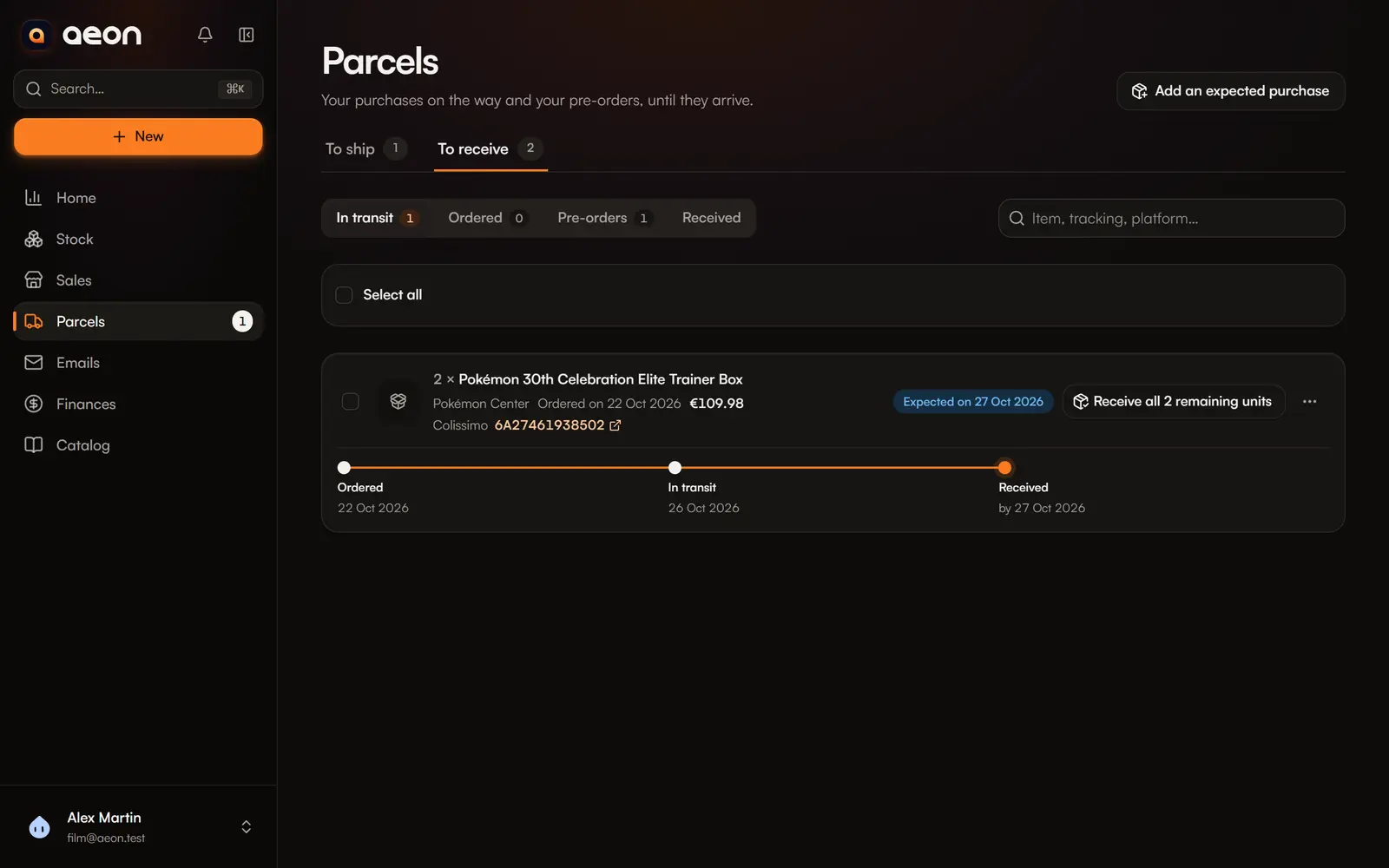
A purchase ordered online or a pre-order is yours before it arrives, but you cannot ship it yet. Parcels › To receive follows these purchases until they are received.
Record a purchase to receive
Three ways:
- Add an expected purchase in Parcels › To receive;
- in Add items, choose the receiving state: Ordered, In transit or Pre-order;
- by importing an order from an email: the purchase is recorded as ordered, with its order number.
Enter the expected arrival (or the release date of a pre-order), and if you have them the order reference and the tracking number.
What the page shows
At the top: units expected, those late, in transit and pre-orders. Then purchases by section: In transit, Ordered, Pre-orders, late ones first.
Each purchase shows the quantity, supplier, order date, reference, cost, units already pre-sold, the arrival badge (Expected on, Expected today, Expected N days ago, Releases on), and the tracking link.
Receive
The parcel left: Mark in transit
With the tracking number, from the purchase's menu.
The parcel arrived: Mark received
The units are then in hand, ready to ship.
A partial delivery? Receive part lets you enter the quantity received in this parcel; the rest stays expected. Several purchases at once: select them, then Mark N received.
Received purchases stay visible under Received, to review or correct their tracking.
Pre-sell
An expected purchase is already part of your stock: it counts in quantity and value, but Aeon shows it apart (“N still to receive”). You can sell it before it arrives, which is common in TCG. Aeon then reminds you to mind the platform's shipping deadline.
When you sell, Aeon takes the units already in hand first. A fully pre-sold purchase stays in To receive: it still has to arrive before it can go out.
Delays
A purchase whose arrival date has passed shows as late: on Home (N late receipts), in the bell, and at the top of the list.