'%20fill-rule='evenodd'%20d='M171.52-16.97H86.06q-35.76%200-60.91-25.15Q0-67.27%200-103.03q0-35.15%2025.15-60.61%2025.15-25.45%2060.91-25.45%2035.15%200%2060.3%2025.45%2025.16%2025.46%2025.16%2060.61v86.06M86.06-146.06q-18.18%200-30.61%2012.73-12.42%2012.72-12.42%2030.3%200%2018.18%2012.42%2030.61Q67.88-60%2086.06-60q17.58%200%2030.3-12.42%2012.73-12.43%2012.73-30.61%200-17.58-12.73-30.3-12.72-12.73-30.3-12.73'/%3e%3c/svg%3e%3c/svg%3e)
Finances
Monthly goal
A profit or revenue goal for the month, followed on Home.
Set a goal
On Home, under the results, Set a monthly goal:
- Track: Net profit or Revenue;
- Amount per month in euros.
Remove the goal deletes it. No goal, no card.
The card
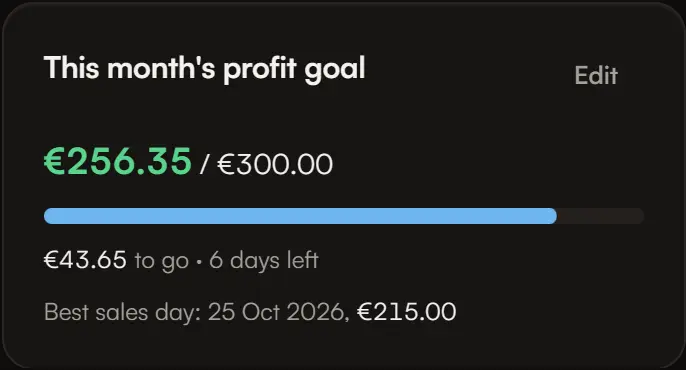
- Where you stand, for example “€212 / €300”, with a progress bar;
- what is left and the days left (today included), or “Goal reached” with the excess;
- your best sales day of the month.
On the 1st of the month, the card starts again from zero; the goal stays until you change it.
The figure tracked
It is exactly the Finances figure for the current month, from the 1st to today:
- net profit = revenue − purchase cost of units sold − fees − postage − expenses;
- revenue = sales, refunds deducted.
Nothing is projected: no end-of-month forecast.