'%20fill-rule='evenodd'%20d='M171.52-16.97H86.06q-35.76%200-60.91-25.15Q0-67.27%200-103.03q0-35.15%2025.15-60.61%2025.15-25.45%2060.91-25.45%2035.15%200%2060.3%2025.45%2025.16%2025.46%2025.16%2060.61v86.06M86.06-146.06q-18.18%200-30.61%2012.73-12.42%2012.72-12.42%2030.3%200%2018.18%2012.42%2030.61Q67.88-60%2086.06-60q17.58%200%2030.3-12.42%2012.73-12.43%2012.73-30.61%200-17.58-12.73-30.3-12.72-12.73-30.3-12.73'/%3e%3c/svg%3e%3c/svg%3e)
Micro-enterprise
The revenue to declare to URSSAF, your ceilings, and the revenue book and purchase register. For French micro-entrepreneurs.
You resell as a French micro-entrepreneur? Aeon prepares your declarations and documents from what you already record.
Aeon prepares, you declare
Aeon computes the amounts and generates the documents; you check them and declare yourself on your URSSAF account. No contribution is estimated.
1. Turn tracking on
In Account › Business tracking:
URSSAF declaration: Monthly or Quarterly
The rhythm chosen on your URSSAF account.
If you chose the micro-entrepreneur profile in your first steps, business mode and the status are already set: only the rhythm is left.
2. Declare each period
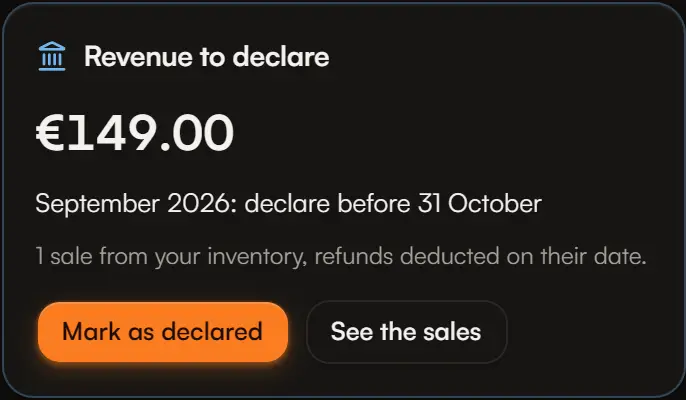
From the first day after a period, Home shows Revenue to declare:
- the period's amount and deadline (“September: declare before 31 October”);
- the number of sales, and See the sales;
- a period without sales: “declare €0”.
Once declared on URSSAF, Mark as declared. The bell reminds you until then.
What is counted
- Sales from your resale inventory, at their sale price (what the buyer paid, before fees), on the sale date;
- refunds, negative, on their date;
- cancelled sales are left out.
Sales from your personal collection are private sales: they are not counted, and are mentioned apart (“2 sales from your personal collection are not counted”).
History
Finances › URSSAF declarations lists the last 12 periods with their amount, deadline and a “declared” tick. If a declared period's sales change afterwards, the declared amount shows next to the current one.
3. Watch your ceilings
The Thresholds card on Home compares the year's revenue with:
- the micro-enterprise ceiling for the sale of goods;
- the VAT exemption: above it, VAT is due from the next 1 January;
- the higher VAT threshold: above it, VAT is due from the day it is exceeded.
The official ceilings are followed automatically. It is information, not tax advice.
4. Your documents
In Finances › URSSAF declarations › Documents, choose the year:
| Document | Content | Formats |
|---|---|---|
| Revenue book | One line per receipt, by date: reference, platform, description, amount, payment method, supporting document. Refunds as negative lines. | CSV, PDF |
| Purchase register | One line per purchase for resale: date, supplier, description, unit cost, total, payment method, supporting document. An unknown cost reads “unknown cost”, never 0. | CSV, PDF |
- The payment method is represented by the platform (“via Vinted”): Aeon does not record how each buyer paid.
- The supporting document is the sale reference, or the name of the receipt attached to the purchase.
- Documents are generated from your records: check them before handing them over. They are not certified by Aeon.
Invoices
To issue a sale's invoice, see Invoices and credit notes.