'%20fill-rule='evenodd'%20d='M171.52-16.97H86.06q-35.76%200-60.91-25.15Q0-67.27%200-103.03q0-35.15%2025.15-60.61%2025.15-25.45%2060.91-25.45%2035.15%200%2060.3%2025.45%2025.16%2025.46%2025.16%2060.61v86.06M86.06-146.06q-18.18%200-30.61%2012.73-12.42%2012.72-12.42%2030.3%200%2018.18%2012.42%2030.61Q67.88-60%2086.06-60q17.58%200%2030.3-12.42%2012.73-12.43%2012.73-30.61%200-17.58-12.73-30.3-12.72-12.73-30.3-12.73'/%3e%3c/svg%3e%3c/svg%3e)
Finances
Year in review
Your figures for the year, what worked best, and a PDF for your tax returns.
Finances › Reports › Year in review sums up a calendar year. In January, Home also shows “Your year in review is ready” for a month.
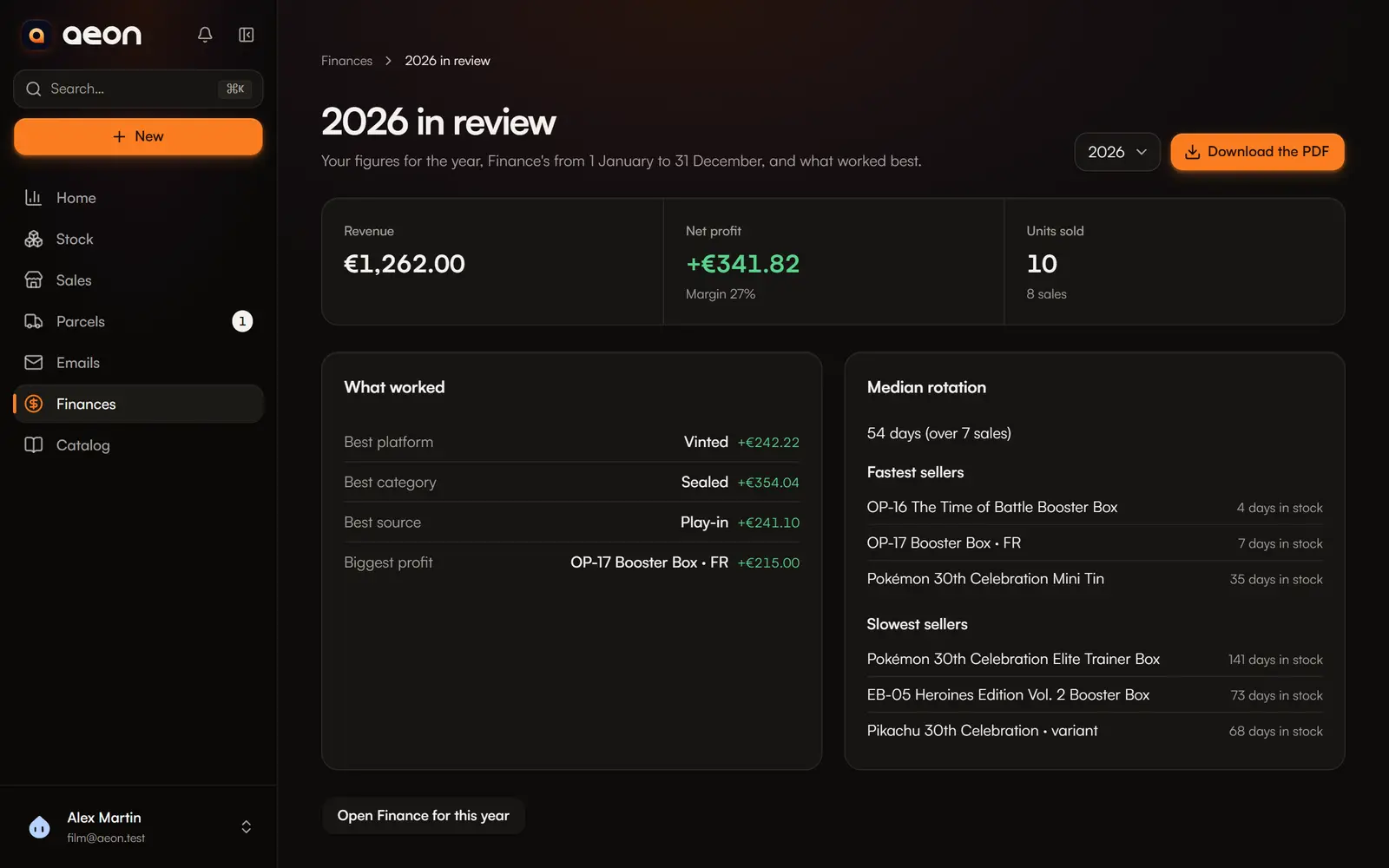
What the review holds
Choose the year (by default, the past year in January, otherwise the current one).
- The figures: revenue, net profit (after expenses), margin, units sold and number of sales. The same as Finances from 1 January to 31 December.
- What worked: best category, best platform and best source (by profit), biggest single profit, fastest and slowest sellers (days in stock), and median rotation.
Stock value never shows here: a review only talks about what is realised.
The actions
- Download the PDF: one A4 page with the same content, in the interface language.
- Open Finance for this year: the full detail.
- For micro-entrepreneurs: the year's revenue book and purchase register. See Micro-enterprise.
A year without sales simply shows “No sales”.