'%20fill-rule='evenodd'%20d='M171.52-16.97H86.06q-35.76%200-60.91-25.15Q0-67.27%200-103.03q0-35.15%2025.15-60.61%2025.15-25.45%2060.91-25.45%2035.15%200%2060.3%2025.45%2025.16%2025.46%2025.16%2060.61v86.06M86.06-146.06q-18.18%200-30.61%2012.73-12.42%2012.72-12.42%2030.3%200%2018.18%2012.42%2030.61Q67.88-60%2086.06-60q17.58%200%2030.3-12.42%2012.73-12.43%2012.73-30.61%200-17.58-12.73-30.3-12.72-12.73-30.3-12.73'/%3e%3c/svg%3e%3c/svg%3e)
Templates and text suggestions
Prepare your titles and descriptions once and for all, with variables, or get a suggested text.
Listing templates
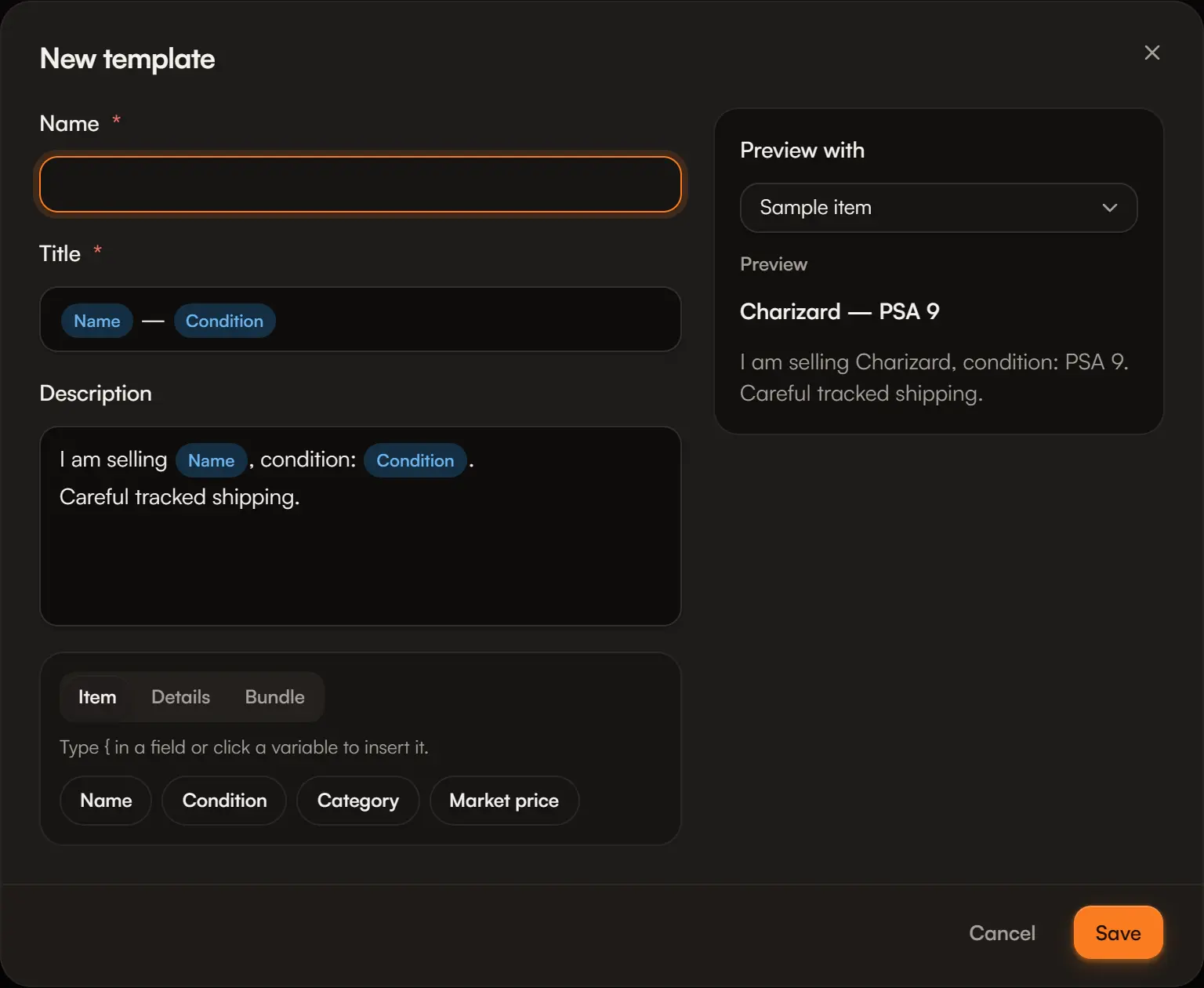
A template is a title and a description with variables replaced by the item's details: {item.name} — {item.condition} becomes “Charizard — Near Mint”.
Open Sales › Listing templates.
Name, title and description
Type { in a field, or click a variable to insert it. Variables are grouped:
- Item: name, condition, category, market price;
- Details: the category's characteristics (game, set, number, language, grading, brand, size…);
- Bundle: item count and item list.
Check the preview
The preview uses a sample item, or an item from your stock (Preview with). A variable with no value for that item is flagged; an unknown variable is kept as typed and underlined.
When creating a listing, pick the template at the Listing text step: it applies to the selected items and updates if you change the selection. If you already edited the text, Aeon shows you the new text before replacing yours.
Listings already created keep their text if you edit or delete a template.
Suggest a text
When the option is available, Suggest a text (next to the template picker) writes a title and a description from the selected items, in the interface language, for the first platform chosen, following the template's structure if there is one.
- The text arrives as an editable draft, marked Suggested — check before publishing.
- Nothing is sent before you click, and nothing is published by itself.
- What is sent: the name, category, condition, characteristics, quantity and note of the chosen items. Never a price, cost, supplier, photo or personal data.
- The instructions forbid inventing a grade, rarity, edition or condition the item does not have: still, read it through.
- A counter shows the suggestions used this month.
Use your own OpenAI key
In Account › Integrations › Text suggestions (AI), Add an OpenAI key routes suggestions through your OpenAI account: no Aeon limit, and OpenAI bills you directly.
Good to know
A ChatGPT subscription does not include an API key: you create one on platform.openai.com, under API keys. Aeon checks the key, encrypts it and only ever shows its last 4 characters. If it is rejected or out of credit, Aeon tells you rather than silently falling back to its own service.