'%20fill-rule='evenodd'%20d='M171.52-16.97H86.06q-35.76%200-60.91-25.15Q0-67.27%200-103.03q0-35.15%2025.15-60.61%2025.15-25.45%2060.91-25.45%2035.15%200%2060.3%2025.45%2025.16%2025.46%2025.16%2060.61v86.06M86.06-146.06q-18.18%200-30.61%2012.73-12.42%2012.72-12.42%2030.3%200%2018.18%2012.42%2030.61Q67.88-60%2086.06-60q17.58%200%2030.3-12.42%2012.73-12.43%2012.73-30.61%200-17.58-12.73-30.3-12.72-12.73-30.3-12.73'/%3e%3c/svg%3e%3c/svg%3e)
Bulk purchase and opening
Spread one price over several items, or open a display to give its contents a real cost.
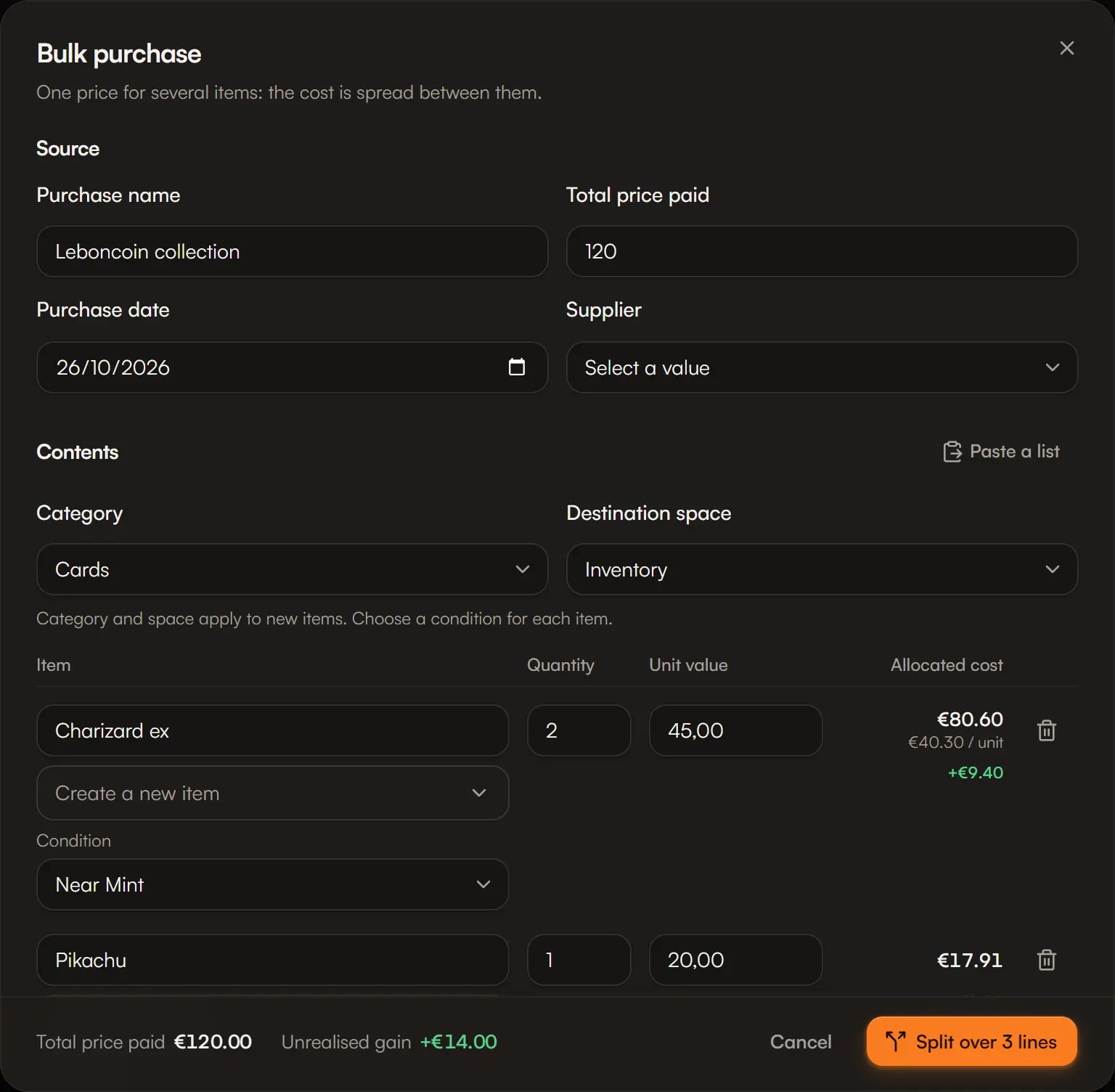
A display, a lot of 200 cards, a whole collection bought at once: you pay one price for several items. For every future sale to show the right margin, that price must be spread over the items. That is what bulk purchase and opening do.
Two cases
| You want to… | Use | Where |
|---|---|---|
| Record a new purchase paid at one price | Bulk purchase | + button › Bulk purchase, or search |
| Open an item already in stock (display, box, lot) | Open / split | The item's menu in Stock, or the stock section of its record |
Step by step
The source
- Bulk purchase: the purchase name (e.g. “Leboncoin collection”), the total price paid, the date and the supplier.
- Open / split: the quantity to open. Aeon shows the consumed cost, the real cost of the opened units.
The contents
One line per item obtained, with its quantity and, if possible, its unit market value. A line can be attached to an item you already have: it then gets a new purchase.
Paste a list speeds things up: one line per item, value optional, for example 2x Charizard ex; 45.
Choose the destination space and the category of new items, then each item's condition.
The cost split
| Method | How the cost is split |
|---|---|
| Market value | In proportion to each line's market value. Every line needs one. |
| Equal shares | Every unit gets the same cost. |
| Manual | You enter each line's cost; left to allocate must reach zero. |
The preview shows each line's allocated cost and unrealised gain live.
Confirm
Split over N lines creates the items and their purchases. Each new purchase shows “From” followed by the source's name.
The rules
- Cost is conserved to the cent. Lines add up exactly to the price paid or the consumed cost, rounding included.
- An unknown cost stays unknown. If the source has no cost, the new items have none either: nothing is estimated instead.
- Opening is not selling. Realised profit does not move; unrealised value moves from the source to its contents.
- Age is kept. The contents take the source's purchase date and supplier, not the opening date.
- Units reserved by a listing cannot be opened. Take them out of the listing first.
- A fully opened source stays in your stock at quantity 0, for history.
- 200 lines at most per operation.